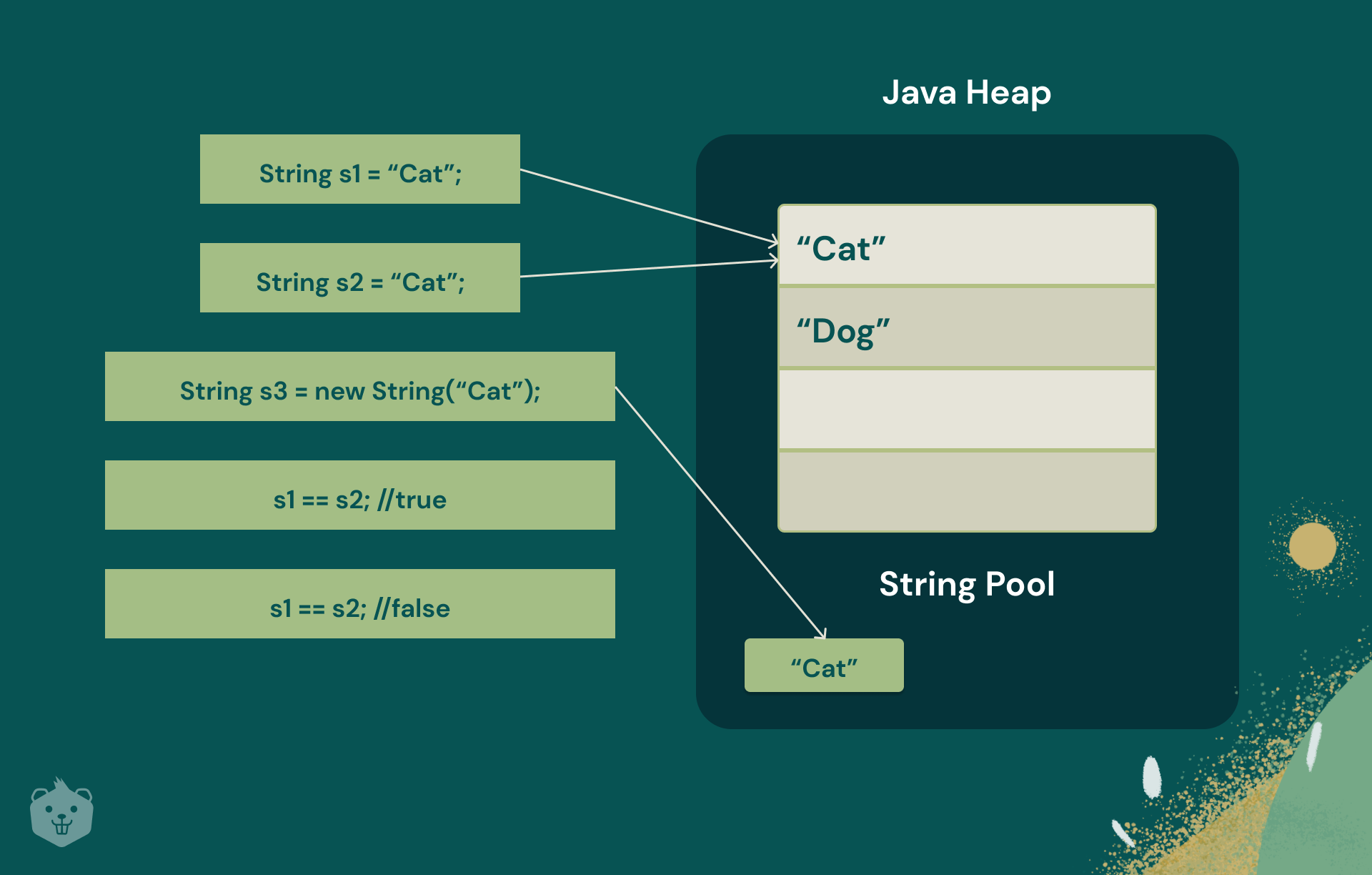

Java is a versatile and widely-used programming language that offers a rich set of built-in functions for manipulating strings. Understanding and effectively utilizing Java String Functions is crucial for any developer working with Java. Strings are fundamental data types in Java, and mastering the various string manipulation techniques can significantly enhance the efficiency and readability of your code.
Understanding Java Strings
In Java, a string is a sequence of characters. The String class in Java provides a variety of methods to perform operations on strings. These methods are essential for tasks such as concatenation, searching, replacing, and formatting strings. Let’s delve into some of the most commonly used Java String Functions.
Basic String Operations
Java provides several basic operations that are frequently used in string manipulation. These include:
- Concatenation: Combining two or more strings.
- Length: Determining the number of characters in a string.
- Substring: Extracting a portion of a string.
- Comparison: Comparing two strings for equality or lexicographical order.
Concatenation
Concatenation is the process of joining two or more strings end-to-end. In Java, you can concatenate strings using the + operator or the concat() method.
Example:
public class ConcatenationExample {
    public static void main(String[] args) {
        String str1 = “Hello”;
        String str2 = “World”;
        String concatenatedString = str1 + “ ” + str2;
        System.out.println(concatenatedString); // Output: Hello World
    }
}
Length
The length() method returns the number of characters in a string. This is useful for various string manipulations and validations.
Example:
public class LengthExample {
    public static void main(String[] args) {
        String str = “Java Programming”;
        int length = str.length();
        System.out.println(“Length of the string: ” + length); // Output: 16
    }
}
Substring
The substring() method allows you to extract a portion of a string. It comes in two overloaded forms:
substring(int beginIndex): Returns the substring from the specified begin index to the end of the string.substring(int beginIndex, int endIndex): Returns the substring from the specified begin index to the end index (exclusive).
Example:
public class SubstringExample {
    public static void main(String[] args) {
        String str = “Java Programming”;
        String subStr1 = str.substring(5); // Returns “Programming”
        String subStr2 = str.substring(0, 4); // Returns “Java”
        System.out.println(subStr1); // Output: Programming
        System.out.println(subStr2); // Output: Java
    }
}
Comparison
Comparing strings in Java can be done using the equals() method for case-sensitive comparison and the equalsIgnoreCase() method for case-insensitive comparison. Additionally, the compareTo() method can be used for lexicographical comparison.
Example:
public class ComparisonExample { public static void main(String[] args) { String str1 = “Hello”; String str2 = “hello”; String str3 = “World”;boolean isEqual = str1.equals(str2); // false boolean isEqualIgnoreCase = str1.equalsIgnoreCase(str2); // true int comparisonResult = str1.compareTo(str3); // -22 (difference in ASCII values) System.out.println("Equals: " + isEqual); System.out.println("Equals Ignore Case: " + isEqualIgnoreCase); System.out.println("Compare To: " + comparisonResult); }
}
Advanced String Operations
Beyond the basic operations, Java provides a range of advanced Java String Functions that offer more sophisticated string manipulation capabilities.
Searching and Replacing
The indexOf() and lastIndexOf() methods are used to find the position of a substring within a string. The replace() and replaceAll() methods are used to replace occurrences of a substring with another substring.
Example:
public class SearchReplaceExample { public static void main(String[] args) { String str = “Hello World”; int index = str.indexOf(“World”); // Returns 6 String replacedStr = str.replace(“World”, “Java”); // Returns “Hello Java”System.out.println("Index of 'World': " + index); System.out.println("Replaced String: " + replacedStr); }
}
Trimming and Splitting
The trim() method removes leading and trailing whitespace from a string. The split() method divides a string into an array of substrings based on a delimiter.
Example:
public class TrimSplitExample { public static void main(String[] args) { String str = “ Hello World “; String trimmedStr = str.trim(); // Returns “Hello World” String[] splitStr = str.split(” “); // Returns [”“, “Hello”, “World”, “”]System.out.println("Trimmed String: '" + trimmedStr + "'"); System.out.println("Split String: " + Arrays.toString(splitStr)); }
}
Formatting Strings
Java provides several ways to format strings, including the String.format() method and the printf() method. These methods allow you to insert variables into strings in a controlled manner.
Example:
public class FormattingExample { public static void main(String[] args) { String name = “John”; int age = 30; String formattedString = String.format(“Name: %s, Age: %d”, name, age); // Returns “Name: John, Age: 30”System.out.println(formattedString); }
}
StringBuilder and StringBuffer
For more efficient string manipulation, especially when dealing with large strings or frequent modifications, Java provides the StringBuilder and StringBuffer classes. These classes offer methods similar to those in the String class but are mutable, allowing for more efficient operations.
Example:
public class StringBuilderExample { public static void main(String[] args) { StringBuilder sb = new StringBuilder(“Hello”); sb.append(” World”); // Returns “Hello World” sb.insert(5, “Java”); // Returns “Hello Java World” sb.delete(5, 9); // Returns “Hello World”System.out.println(sb.toString()); }
}
Commonly Used Java String Functions
Here is a table summarizing some of the most commonly used Java String Functions:
| Method | Description | Example |
|---|---|---|
charAt(int index) |
Returns the character at the specified index. | str.charAt(0) // Returns ‘H’ for “Hello” |
contains(String substring) |
Checks if the string contains the specified substring. | str.contains(“World”) // Returns true for “Hello World” |
endsWith(String suffix) |
Checks if the string ends with the specified suffix. | str.endsWith(“World”) // Returns true for “Hello World” |
startsWith(String prefix) |
Checks if the string starts with the specified prefix. | str.startsWith(“Hello”) // Returns true for “Hello World” |
toLowerCase() |
Converts the string to lowercase. | str.toLowerCase() // Returns “hello world” for “Hello World” |
toUpperCase() |
Converts the string to uppercase. | str.toUpperCase() // Returns “HELLO WORLD” for “Hello World” |
isEmpty() |
Checks if the string is empty. | str.isEmpty() // Returns true for “” |
toCharArray() |
Converts the string to a character array. | str.toCharArray() // Returns [‘H’, ‘e’, ‘l’, ‘l’, ‘o’] for “Hello” |
📝 Note: The StringBuilder and StringBuffer classes are particularly useful for performance-critical applications where string modifications are frequent. StringBuffer is thread-safe, making it suitable for multi-threaded environments, while StringBuilder is not thread-safe but offers better performance.
Mastering Java String Functions is essential for any Java developer. These functions provide a robust set of tools for manipulating strings efficiently and effectively. Whether you are concatenating strings, searching for substrings, or formatting output, understanding and utilizing these functions can significantly enhance your coding skills and the performance of your applications.
In summary, Java offers a comprehensive suite of Java String Functions that cater to a wide range of string manipulation needs. From basic operations like concatenation and length determination to advanced techniques like searching, replacing, and formatting, these functions are indispensable for any Java developer. By leveraging these functions, you can write more efficient, readable, and maintainable code.
Related Terms:
- java string functions with examples
- java string methods all
- java string functions w3schools
- basic string methods in java
- java string operations
- different string methods in java